Set up your workspace
A workspace is one brand: its own channels, team and conversations. Setting one up takes a couple of minutes, and it starts by asking what you’re here for, so your first steps are the ones that matter to you.
Create your workspace
Sign up at https://app.channeldesk.ai.
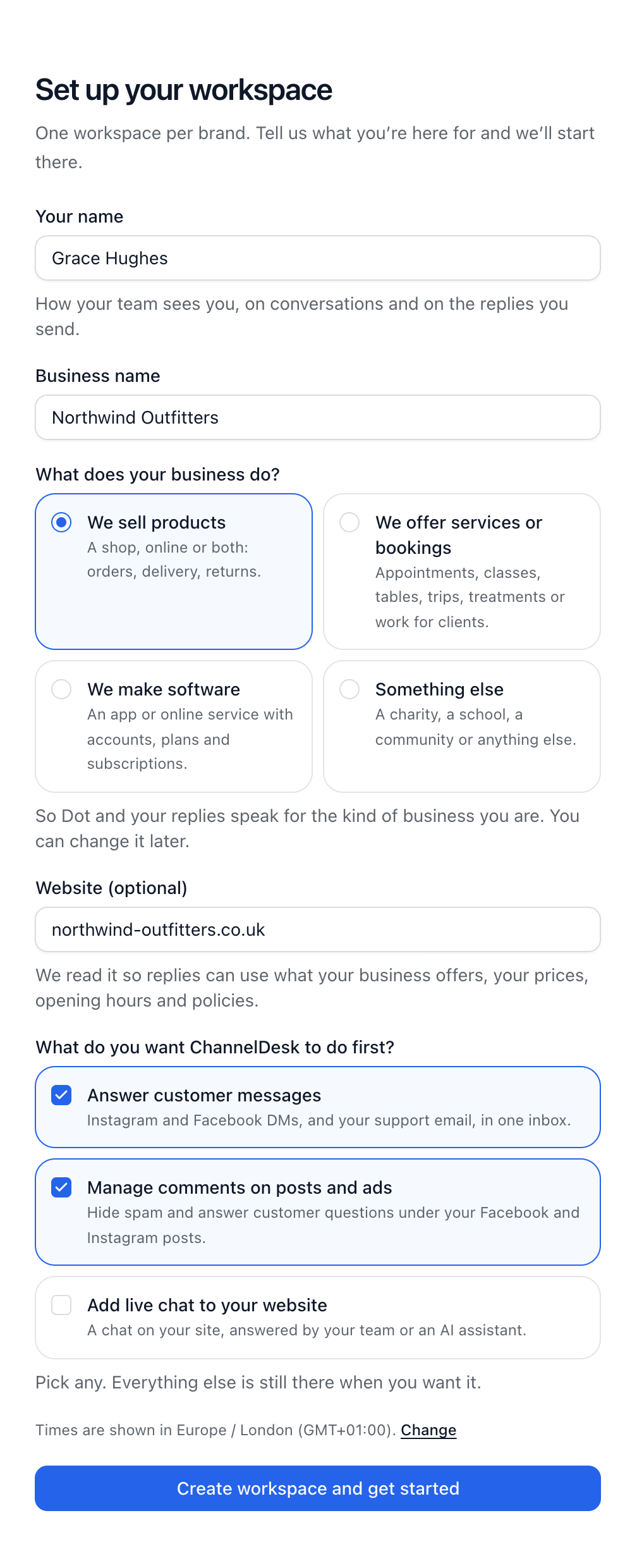
On Set up your workspace, enter your name and your business name.
Under What does your business do?, choose the one closest to yours. It helps Dot and your replies speak for the kind of business you are.
Add your website if you have one. We read it so replies can use what your business offers, your prices, opening hours and policies.
Under What do you want ChannelDesk to do first?, pick any of Answer customer messages, Manage comments on posts and ads, and Add live chat to your website.
Check the time zone shown, and change it if it’s wrong.
Select Create workspace and get started.
Follow Get started
Next you land on Get started: the steps for what you picked, in the order that gets you going fastest, such as connecting a channel, checking your approved answers and inviting your team. Each step ticks itself as soon as it’s done. Steps for the things you didn’t pick are there too, for later.
Once you’re set up, choose Hide from the sidebar to put Get started away.
Did this answer your question?