Customer profiles, customer fields and joining duplicates
People lists everyone who has written to you, on any channel, most recently active first. Each person has a page with their details, every conversation they’ve had with you, and how they reach you.
Find someone
Open People. Search by name or email, or choose a channel to see only the people who reach you there. Your first few customer fields show as columns. The same details, and the fields to fill in, show beside each conversation in the inbox.
Add customer fields
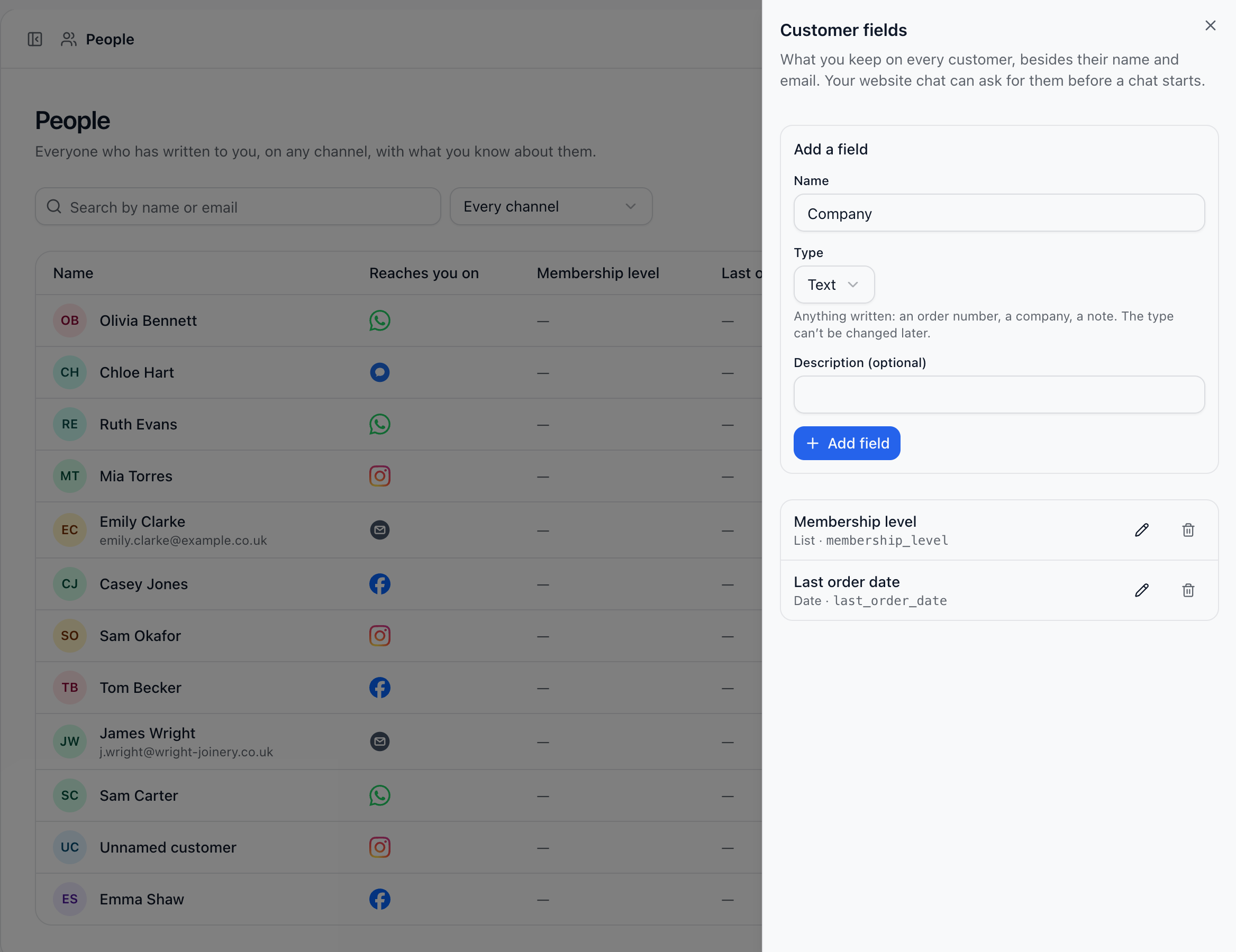
Customer fields are what you keep on every customer besides their name and email, like a membership level, a company or a booked appointment.
On People, choose Customer fields.
Give the field a name and choose its type: Text, Number, Date, Date & time, True/False or List.
Add a description if it helps your team, then choose Add field.
Only people who can change settings add, rename or remove fields. Anyone who can sort the inbox can fill them in. Renaming a field keeps its values; removing one removes its values too.
Join two records of the same person
The same customer can end up as two people, say once from Instagram and once by email. When two people share a name, the person’s page asks Same person? under Reaches you on. Choose Yes, join them: their conversations, tickets and ratings come together on the page you’re on. Every customer field value is kept, and where both had one, the person whose page you’re on keeps theirs.
Joined by mistake? Choose Separate beside one of the ways they reach you, and it becomes a person of its own, with its conversations. Two different accounts from your own website can never be joined.
Did this answer your question?