Connect Instagram and Facebook Pages
Connect a Facebook Page to bring in its Messenger messages and the comments on its posts, including ads you run as Page posts. Connect an Instagram account for its DMs and the comments on your posts and reels. Only a workspace owner can connect channels.
Instagram has to be a professional account linked to a Facebook Page. A personal account can’t be connected.
Connect
Go to Channels and select Connect Facebook Page or Connect Instagram professional account.
Sign in with Facebook and allow access in Meta’s window.
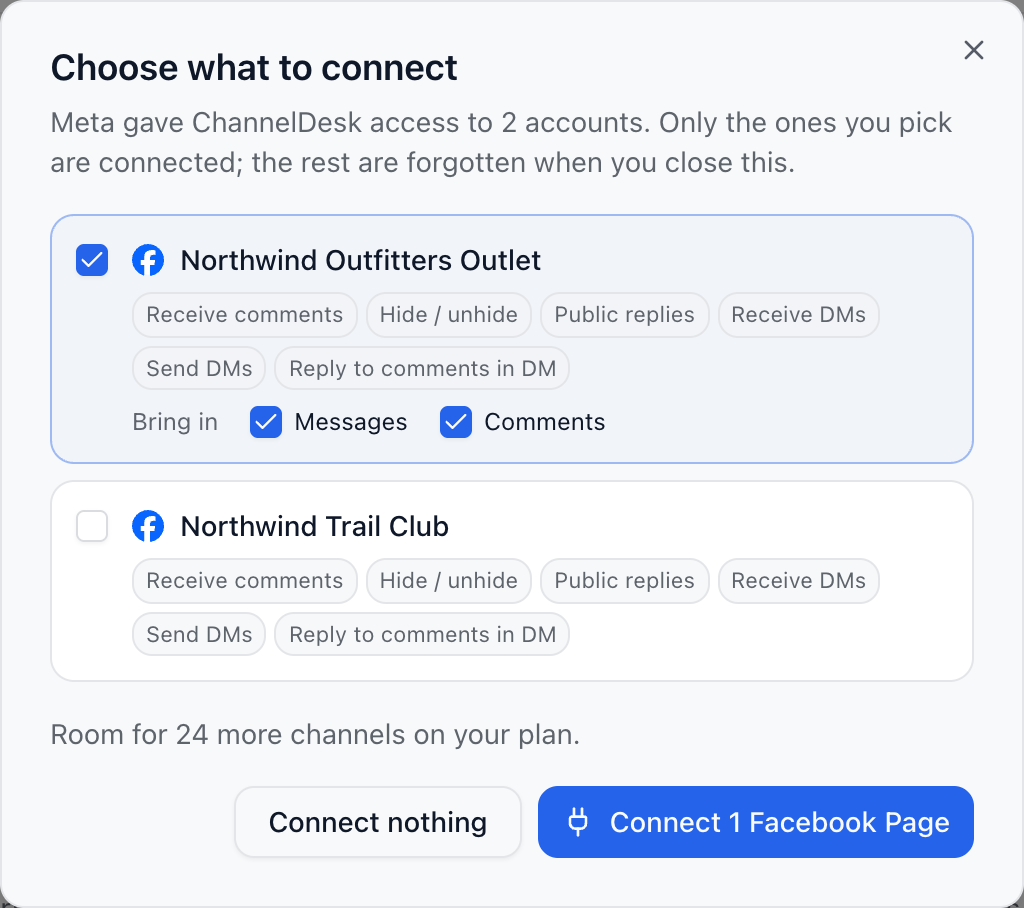
Back in ChannelDesk, under Choose what to connect, tick the Pages or accounts you want. Meta may give access to several; only the ones you tick are connected, and the rest are forgotten.
Under Bring in, choose Messages, Comments or both for each one.
Select Connect.
The last 7 days of comments come in when you connect, so you can catch up straight away.
Messages, comments or both
Each Page and Instagram account has Messages and Comments switches on its card in Channels. Only what’s on comes in, and counts toward your active contacts. Turning one back on reads in the last week. One always stays on; to stop both, disconnect.
Did this answer your question?