Ticket types and keeping customers posted
A ticket type says what a ticket is for, how pressing it is to start with and how long it should take. Every workspace has Request, Task and Tracker, one of each kind. Set them up in Settings → Tickets.
Every plan: Request, Task and Tracker, which you can rename and describe.
Pro and up: types of your own, the ones suggested for what your business does, and target times.
Add or change a type
Go to Settings → Tickets, and choose New type under the kind you want, or open a type to change it.
Give it a Name and say When to use it. Dot reads this when it suggests a type, so be specific.
Choose the Priority to start with.
On Pro, choose Due within to set each new ticket’s due date. Waiting on the customer stops the clock.
Choose Add type, or Save changes.
A type you no longer need can be archived: old tickets keep it, new ones can’t have it. The last type of each kind always stays.
Keep customers posted (Pro)
On a request type, switch on Tell the customer. Customers then hear where they wrote, in their own language, when their ticket is opened, when someone starts on it, and when it’s resolved. On a tracker, Tell each customer says it’s known and being tracked when their conversation joins, and that it’s fixed when it’s resolved. The type’s page shows what the customer is told.
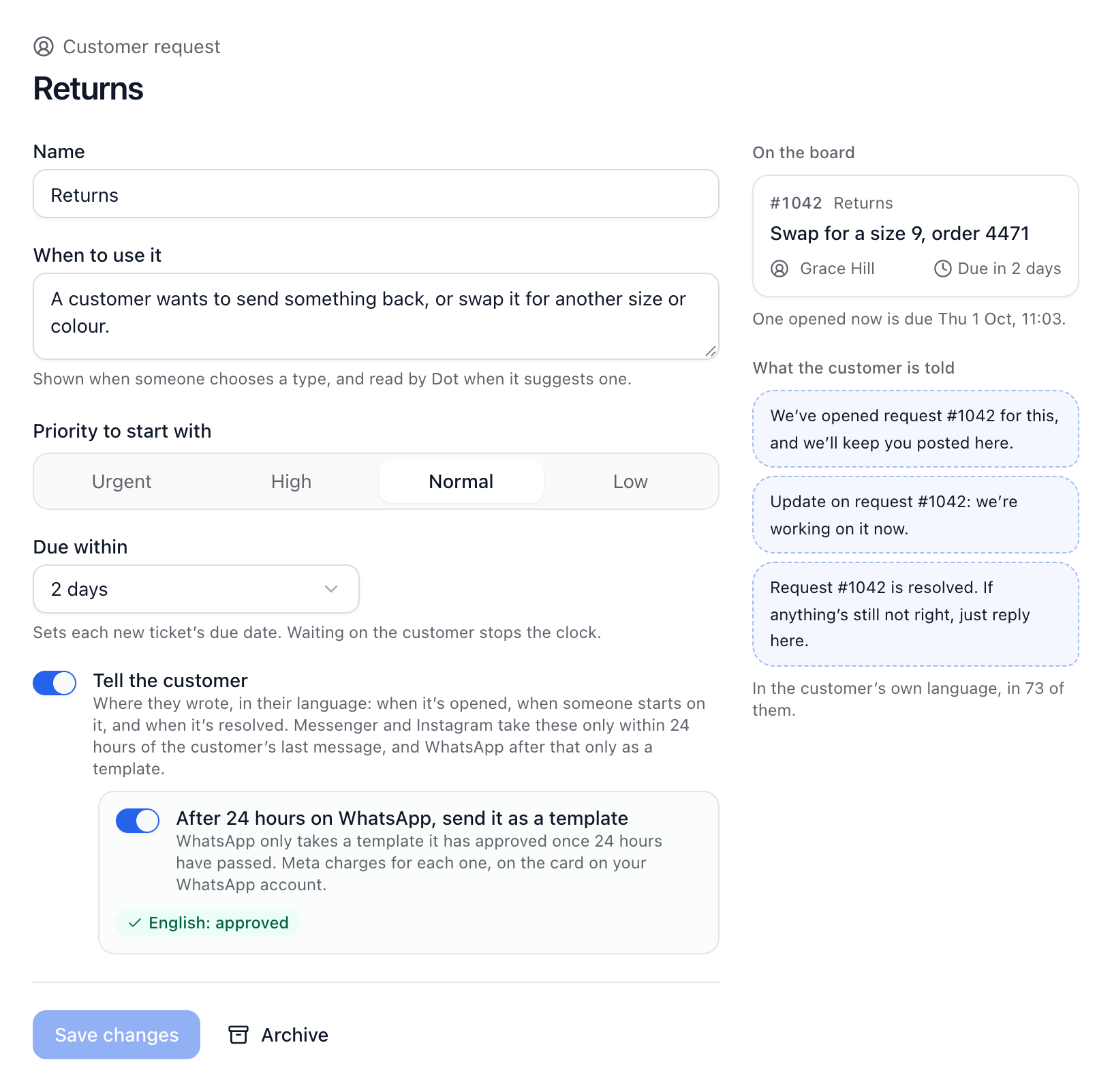
Each update shows in the conversation marked as the ticket’s, so your team can tell it apart from a reply.
After 24 hours
WhatsApp: with After 24 hours on WhatsApp, send it as a template switched on, the update goes as a template WhatsApp has approved. ChannelDesk submits the template for you, and the update goes once it’s approved. Meta charges for each one, on the card on your WhatsApp account.
Messenger and Instagram: updates only go within 24 hours of the customer’s last message.
When an update can’t go, the ticket’s history says why.
Did this answer your question?